


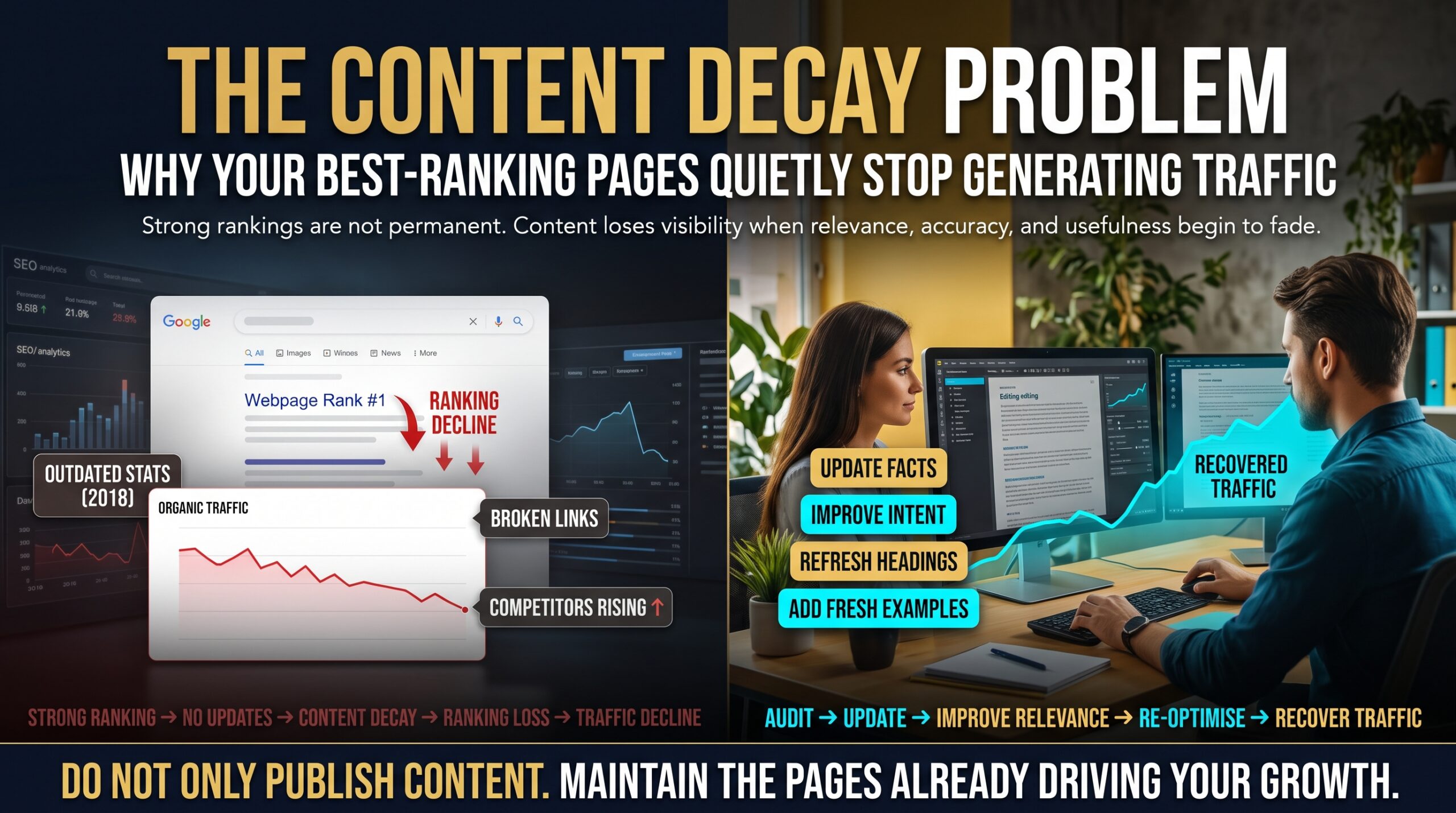
Content decay is what happens when a page that once ranked well slowly loses traffic, and nobody notices until the monthly report looks flat. There’s no penalty notice, no sudden crash and no error in your dashboard. The page that brought in leads for two years just gets a little less attention each month, until it barely registers.
If you’ve ever looked at an old blog post and wondered where all its visitors went, you’ve seen this first hand. This guide explains what content decay is, why your best-ranking pages are often the most exposed, how to find the damage using free Google tools and how to fix it without rewriting your whole website. We’ll also look at what it means for local businesses in Sydney, Melbourne, Brisbane, Perth, Canberra and Adelaide, where accuracy and freshness matter even more.
What Is Content Decay?
Content decay is the gradual decline in organic traffic, rankings, clicks or conversions that a published page experiences as it ages. You’ll also hear it called traffic decay or SEO decay. The key word is gradual. A page hit by a technical fault or a manual action drops fast. Decay creeps.
Think of it like a shopfront. A fresh coat of paint and a tidy window display win customers in year one. By year three, the paint is peeling, the signage is out of date and the shop next door looks better. Nothing dramatic happened. You just stopped maintaining it.
It matters because your best pages usually carry the most weight. A single guide or service page can drive a big share of your organic enquiries. When it slips from position two to position seven, traffic doesn’t dip by a few per cent. It can fall sharply, because most clicks go to the first few results.
Why Your Best-Ranking Pages Quietly Stop Generating Traffic
There’s rarely one cause. Content decay builds up from several small shifts, and most of them happen outside your website.
The information goes out of date
Prices change, rules are updated, tools are renamed and screenshots age. Google aims to show helpful, accurate and current answers. If your guide still describes last year’s process, a competitor with a newer version will eventually overtake it.
Search intent shifts
What people mean by a query changes over time. A search that once wanted a long how-to guide may now favour comparison pages, videos or quick answers. If your page answers yesterday’s intent, it slides even though nothing on it is technically wrong.
Competitors publish something better
Rankings are relative. Your page can stay exactly the same and still lose ground, because three newer pages arrived with more depth, clearer structure and fresher examples.
The search results page itself changes
Featured snippets, People Also Ask boxes, local packs, shopping results and AI-generated summaries can push organic listings down the page or answer the question before anyone clicks. Your rankings may hold while your clicks fall. That’s content decay too, just from a different angle.
Backlinks vanish and links break
Pages that once linked to you get deleted, redirected or reworded. Your own internal links may point to old or broken URLs. Over time, the authority supporting the page weakens.
Technical issues creep in
Slower load times after a redesign, bloated plugins, broken schema and mobile layout problems quietly damage the experience. You can test a page for free with PageSpeed Insights.
Your own pages compete with each other
Keyword cannibalisation happens when two or more of your pages target the same query. Google may swap between them, and neither performs as well as one strong page would. It’s a common hidden cause of content decay on sites that have published steadily for years.
It’s seasonality, not decay
Before you panic, check the calendar. Tax content dips after the end of the financial year on 30 June, and summer topics fade in winter. Compare year on year, not just month on month. Google Trends helps you see whether interest in the topic itself is falling.
Warning Signs of Content Decay on Your Website
Wondering whether this is already happening to you? Look for these signals:
- Organic clicks to your top pages have fallen for three or more months in a row.
- A page that once held a top-three position has drifted to page one’s lower half or page two.
- Leads or enquiries are down, but nothing obvious has changed on the site.
- Your best posts show a publish date from two or more years ago and haven’t been reviewed since.
- Competitors’ newer pages now appear above yours for the same searches.
- Your team keeps publishing new posts instead of looking after the ones that already work.
If two or more of those sound familiar, content decay is probably costing you traffic right now.
A Realistic Example: The Guide That Slowly Faded
Here’s an illustrative scenario that mirrors what many Australian businesses experience. A Brisbane home services company publishes a detailed guide to hot water system replacement costs. It reaches the top three for several high-intent searches and becomes its biggest source of quote requests.
Then nobody touches it. Over the next eighteen months, supplier prices change, two competitors publish newer cost guides with calculators, and a featured snippet starts taking the top of the results page. Rankings slip from position two to position six. Clicks fall. The quote form gets quieter.
The business assumes demand has cooled and increases its ad budget. In reality, demand hasn’t moved at all. The page has simply aged. A focused refresh with updated pricing, a clearer comparison table, new internal links and a rewritten introduction is all it needed.
Nothing in that story is dramatic, and that’s the point. This is how content decay usually looks in real life: slow, quiet and very easy to misdiagnose.
How to Find Content Decay Using Google Search Console and GA4
You don’t need paid software to start. Google’s own free tools show you most of what you need.
1. Compare date ranges in Search Console
Open the Performance report in Google Search Console and use the compare option to set the last three months against the previous three months. Then do the same with the last 12 months against the same period a year earlier. Search Console only keeps about 16 months of data, so don’t leave this too long.
2. Sort your pages by click loss
Switch to the Pages tab and sort by the change in clicks. The biggest losers at the top of the list are your first candidates.
3. Check impressions and position separately
If impressions and average position held but clicks fell, the search results layout or your title is the likely culprit. If position fell, the page is being outranked.
4. Cross-check with Google Analytics
In Google Analytics, look at organic landing page sessions, engagement and conversions. A page that keeps its traffic but loses conversions is suffering from a different kind of content decay, usually an out-of-date offer or a weak call to action.
5. Build a simple decay list
Record the URL, main keyword, traffic then and now, position change, last updated date and suspected cause. Even a spreadsheet with 20 rows will tell you where to start. Use this table to interpret what you find:
| Signal | Likely cause | Next step |
| Clicks down, position down | Outranked by newer or deeper content | Refresh and expand the page |
| Clicks down, position stable | Search result features or a weak title and meta description | Rewrite title and meta; target snippets |
| Impressions down | Falling demand or seasonality | Compare year on year; check Google Trends |
| Traffic steady, conversions down | Outdated offer, weak call to action or intent mismatch | Update the offer, intro and CTAs |
| Two of your pages swap rankings | Keyword cannibalisation | Consolidate and 301 redirect |
| Sudden, sharp drop across many pages | Technical fault or algorithm change, not decay | Investigate technical SEO first |
How to Fix Content Decay: A Simple Triage
Not every decaying page deserves the same treatment. Sort each one into one of five buckets.
Refresh
Best for pages that still rank well but have slipped slightly. Update the facts, examples, headings and links while keeping the URL and the core structure.
Rewrite
Best for pages that no longer match search intent. Look at what’s ranking now, then rebuild the page around that need while keeping the parts that still work.
Consolidate
Best for overlapping pages. Merge them into one stronger page and 301 redirect the weaker URLs to it. This is the cleanest cure for cannibalisation.
Retire
Best for thin pages with no traffic, no links and no purpose. Remove them, redirect to a relevant alternative where one exists, or return a 410 where it doesn’t.
Leave alone
Some pages are fine. If the dip is seasonal, or the topic is evergreen and still accurate, leave it and recheck next quarter.
Content Refresh Checklist: What to Update on a Decaying Page
| Area | What to do |
| Title tag and meta description | Keep the main keyword near the front, add a clear benefit and check the length. |
| Introduction | Answer the search intent in the first 100 words. |
| Facts, prices and screenshots | Replace anything outdated and cite a reliable source. |
| Headings | Match current related searches and People Also Ask questions. |
| Entities and related terms | Add missing concepts, tools, places and names that top-ranking pages cover. |
| Internal links | Link to and from relevant service, location and blog pages. |
| External links | Fix broken links and add authoritative sources. |
| Images and speed | Compress images, update alt text and test page speed. |
| Schema markup | Add or validate Article and FAQ markup. |
| Visible date | Change it only when the update is genuine. |
| Re-indexing | Use URL Inspection in Search Console to request indexing. |
A quick word on dates. Changing the published date without changing anything meaningful isn’t a shortcut that works, and it frustrates readers who can see nothing is new. Update the page properly, then update the date. Google’s own Search Central documentation is a useful reference for what helpful, people-first content looks like.
How to Prevent Content Decay Before It Starts
- Audit your top 20 pages by traffic or revenue every quarter.
- Give every key page an owner, so someone is responsible for keeping it accurate.
- Track a “last reviewed” date in your content calendar, separate from the publish date.
- Plan roughly one refresh for every new post you publish.
- Watch Australian seasonal moments such as end of financial year, Black Friday, Boxing Day and school terms.
- Re-promote refreshed pages through email and social media marketing so they earn fresh engagement signals.
While a decaying page is being repaired, a well-run PPC and Google Ads campaign can keep leads flowing for the same searches. And if you’d rather not manage the audit yourself, our SEO services include content reviews that catch decay early.
Content Decay and Local SEO: What It Means in Australian Cities
Location pages and local guides decay faster than most, because the details are tied to real businesses: opening hours, addresses, prices, reviews and Google Business Profile information. Here’s how it tends to play out across the country.
- Sydney: Competitive markets mean rivals refresh their pages often, so a stale page loses ground quickly. See our Sydney digital marketing services.
- Melbourne: Large service and retail sectors where outdated prices and offers erode trust. See our Melbourne digital marketing services.
- Brisbane: Fast-growing suburbs and new competitors mean local guides need regular updating. See our Brisbane digital marketing services.
- Perth: Long distances and specialised industries make accurate local detail a real ranking advantage. See our Perth digital marketing services.
- Canberra: Professional and government-adjacent audiences expect current, accurate information. See our Canberra digital marketing services.
- Adelaide: A close-knit local market where reviews and fresh local content build trust. See our Adelaide digital marketing services.
Businesses elsewhere in Australia, including Hobart, can be supported online. You can see everywhere we work on our locations page.
Frequently Asked Questions About Content Decay
What is content decay in SEO?
Content decay in SEO is the slow loss of organic traffic, rankings or conversions from a page that used to perform well. It’s usually caused by outdated information, changing search intent, stronger competitors and changes to the search results page.
How long does it take for content to decay?
It varies by topic. Fast-moving subjects such as technology, pricing and legislation can show decay within months. Evergreen topics may hold for years. The only reliable way to know is to monitor your pages in Search Console.
How do you fix content decay?
Find the affected pages, work out the cause, then refresh, rewrite, consolidate or retire each one. Updating facts, matching current search intent, improving internal links and fixing technical issues usually recovers most lost traffic.
Does changing the date on an old post help rankings?
Not on its own. A visible date should reflect a real update. Make meaningful improvements first, then update the date so readers and search engines can see the page is current.
Is content decay the same as an algorithm update drop?
No. Algorithm-related drops are usually sudden and affect many pages around the same time. Content decay is gradual and affects pages one at a time. If your traffic fell sharply overnight, investigate technical SEO and recent Google updates first.
How often should I audit my content for decay?
Once a quarter for your most valuable pages, and once or twice a year for the rest. High-competition topics may need a monthly check.
Final Thoughts: Look After the Pages That Already Work
Content decay isn’t a sign that you’ve done something wrong. Every page that ranks eventually attracts competitors, and every fact eventually ages. The businesses that keep their traffic are simply the ones that notice early and maintain what they’ve built, instead of always chasing the next new post.
A refreshed page that already has history, links and authority will often outperform a brand-new one. Protect your best pages and they’ll keep earning for you.
Want a second pair of eyes on your site? Request a free marketing review through our contact page or call 1300 649 299. You can also explore our full range of digital marketing services, browse the FAQs, read more on our blog or learn about us.