


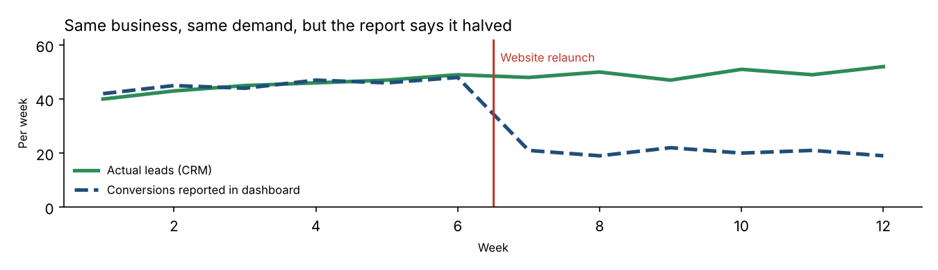
Conversion tracking drift is what happens when your website changes but your tracking does not. The dashboard keeps reporting numbers every week, so everything looks normal. But the numbers slowly (or suddenly) stop matching what is really happening in your business. If your Google Ads report says leads halved after the new website went live, yet your phone is still ringing, you are probably looking at conversion tracking drift.
This guide explains why it happens, how to spot it, and how to fix it. It is written for Australian business owners, marketing managers and anyone who pays for Google Ads, SEO or social campaigns and relies on reports to make decisions. Whether you are in Sydney, Melbourne, Brisbane, Perth, Adelaide or Canberra, the causes and cures are the same.
What Is Conversion Tracking Drift?
A conversion is any action you care about: a form submission, a phone call, a booking, a purchase, a quote request. Tools such as Google Analytics 4, Google Ads and Meta Ads count these actions using tags, pixels and events placed on your website.
Conversion tracking drift is the gap that opens between what those tools report and what actually happens. It rarely comes from one big failure. It builds up through small changes: a new form plugin, a renamed thank-you page, a cookie banner, a checkout update. Each one can quietly break or duplicate a tag. The result is a report that is wrong, but looks perfectly believable.
It is a close cousin of general measurement problems covered in web analytics, but with one key difference: drift is caused by change over time, not by a bad setup on day one.
Why Conversion Tracking Drift Happens After Website Changes
Tracking is tied to the structure of your site. When the structure moves, the tracking often stays behind. These are the most common triggers we see:
- A redesign or rebuild. New templates mean the old tags are either missing or fire on the wrong pages.
- Changed thank-you page URLs. Many setups count a conversion when someone lands on /thank-you. Rename that page and the count drops to zero.
- A new form plugin or booking tool. Embedded forms, pop-ups and iframes often stop sending the events your tags listen for.
- Google Tag Manager edits. A new tag, a changed trigger or a published container with a small mistake can break several conversions at once.
- Cookie and consent banners. If consent settings block tags, you lose data from users who decline cookies. Setups that ignore Consent Mode can under-report.
- Payment gateway or checkout changes. Moving to a new payment provider can break purchase events and revenue values.
- Call tracking and phone number changes. A new number on the site that is not linked to your call tracking means calls vanish from reports.
- CRM or email tool migrations. Lead status or source fields get renamed, so reports built on them stop matching.
- Duplicate tags. The old agency tag and the new one both fire, so the same lead is counted twice.
None of these look like a crisis on the day. That is the point. Conversion tracking drift often goes unnoticed for weeks or months.
Warning Signs of Conversion Tracking Drift
Check for these red flags in your reports:
- A sudden jump or drop in conversions that lines up with a website change, not with ad spend or season.
- Google Ads, GA4 and your CRM all show different lead numbers.
- Conversion rate looks wildly high (duplicate tags) or close to zero (broken tags).
- More leads arrive by phone or email than your dashboard can explain.
- Smart Bidding campaigns suddenly perform worse after a site update.
- Traffic sources in GA4 show a rising share of “direct” or “unassigned”.
- Your team stops trusting the report and starts using gut feel.
Example: How Conversion Tracking Drift Hid a Good Campaign
Take a home services business in Sydney that relaunched its website over a weekend. The web developer built a new quote form that loads inside a pop-up. The old tracking tag listened for a page load on the thank-you page, but the new form shows a message on the same page instead.
From Monday, Google Ads shows almost no conversions. The marketing manager sees a cost per lead that has doubled, and pauses two of the best campaigns. In truth, leads kept arriving at the same rate. The sales team simply were not asking where each one came from. Six weeks of budget decisions were made on data that was wrong. (This is an illustrative scenario, not a specific client.)
The Real Cost of Conversion Tracking Drift
Wrong numbers are not just annoying. They lead to expensive decisions:
- Wasted ad spend. Automated bidding learns from your conversion data. Feed it broken data and it optimises for the wrong things.
- Good campaigns paused, poor ones scaled. Budget moves to what looks best on paper, not what truly works.
- Weak SEO decisions. Pages that really drive enquiries may look useless, so they get cut or ignored.
- Broken trust. When reports and bank balances disagree, owners lose confidence in marketing as a whole.
- Missed insights. Months of history become unreliable, making year-on-year comparisons meaningless.
How to Fix Conversion Tracking Drift: 7 Steps
1. Compare your three sources of truth
Line up conversions from your ad platform, GA4 and your CRM or sales records for the same dates. The CRM is your reference. Anything that differs by more than a small margin needs investigating.
2. Test every conversion by hand
Submit the form, make the call, complete the test purchase. Use Google Tag Assistant and the preview mode in Google Tag Manager to confirm each tag fires once, on the right action.
3. Track actions, not page addresses
Where possible, trigger conversions from events (form submit, button click, booking confirmed) rather than from a specific URL. Events survive redesigns far better than page paths.
4. Keep a website change log
Record every change: plugin updates, theme changes, new forms, tag edits. When numbers move, you can check the log first. This one habit prevents most conversion tracking drift.
5. Add tracking to your launch checklist
No website change should go live without a tracking sign-off. Build a pre-launch and post-launch checklist (see below) and make the developer and the marketer both accountable.
6. Use enhanced conversions and consent-aware tagging
Enhanced conversions and Consent Mode help recover some lost measurement while respecting user choice. Australian businesses should also check their obligations under the Privacy Act. The Office of the Australian Information Commissioner has current guidance.
7. Reconcile monthly and set alerts
Once a month, compare platform numbers to CRM numbers and write down the difference. Set alerts for sudden drops in conversions or spikes in direct traffic so you find drift in days rather than months.
Which Website Changes Cause the Most Conversion Tracking Drift?
| Website change | Tracking risk | What to check |
| Full redesign or new theme | Tags missing or firing on wrong pages | Tag Manager preview on every key page |
| New form or booking plugin | Submit events no longer fire | Test submit, confirm event in GA4 DebugView |
| Renamed or removed thank-you page | Page-based conversions drop to zero | Update triggers or move to event-based tracking |
| New cookie banner | Tags blocked before consent | Consent Mode settings, test accept and decline |
| Checkout or payment change | Purchase and revenue data lost | Test order and check transaction values |
| New phone number | Calls missing from reports | Call tracking number swap and call events |
Post-Launch Checklist to Prevent Conversion Tracking Drift
- Submit every form and confirm one conversion is recorded in GA4 and in Google Ads.
- Place a test call from a mobile and check it is logged.
- Run a test purchase and confirm the order value is correct.
- Make sure old tags have been removed and nothing fires twice.
- Check consent banner behaviour for accepted and declined cookies.
- Confirm UTM parameters and click IDs still pass through to your CRM.
- Compare the first week of data against the week before launch.
Get Expert Help With Conversion Tracking in Australia
A tracking audit is one of the fastest ways to improve results without spending more on ads. Our team reviews your tags, events and reports, then fixes what is broken so your numbers match reality. Explore our digital marketing services, including SEO services, PPC and Google Ads management and social media marketing.
We work with businesses in:
- Digital marketing in Sydney
- Digital marketing in Melbourne
- Digital marketing in Brisbane
- Digital marketing in Perth
- Digital marketing in Adelaide
- Digital marketing in Canberra
Want to know more first? Read our FAQs, see all service locations, learn about us, or contact us on 1300 649 299 for a free marketing review.
Conversion Tracking Drift FAQs
What is conversion tracking drift?
It is the growing gap between the conversions your tools report and the real results in your business, usually caused by website or system changes that break or duplicate tracking.
How do I know if my conversion tracking is broken?
Compare ad platform and GA4 numbers with your CRM or sales records. If they disagree, or conversions change suddenly after a website update, test each form, call and purchase with Tag Assistant or Tag Manager preview.
Can a website redesign affect Google Ads conversions?
Yes. New templates, forms and page URLs can stop tags from firing, which makes Google Ads report fewer conversions and can mislead automated bidding.
How often should I audit conversion tracking?
Check after every website change and run a full audit at least every quarter. A light monthly reconciliation against your CRM catches most problems early.
Why do GA4, Google Ads and Meta show different conversion numbers?
Each platform uses its own attribution rules, windows and data sources, so small differences are normal. Large or growing gaps usually point to tracking problems.
Final Thoughts on Conversion Tracking Drift
Reports do not become wrong overnight, and they do not announce it when they do. Conversion tracking drift is a slow leak that costs real money. The fix is not complicated: test after every change, track events instead of page addresses, keep a change log and reconcile with your CRM every month. Do that and your reports will once again tell the truth about your marketing.
Need a hand? Explore our digital marketing services in Australia or request a free review today. For more practical advice, visit the Digital Marketing Services blog.