


Content refresh is the job nobody puts on the calendar, and it is often the reason a once-reliable page quietly stops earning its keep. The article that used to bring in enquiries every week is still live, still looks fine, and yet its traffic has been sliding for months. Nothing broke. Nobody noticed. That slow decline is content decay.
In this guide we explain why high-traffic pages lose rankings and leads, how to spot the damage early, and how to run a simple refresh process that wins ground back. If you run a business in Sydney, Melbourne, Brisbane, Perth, Adelaide or Canberra, you can start with the steps below this week.
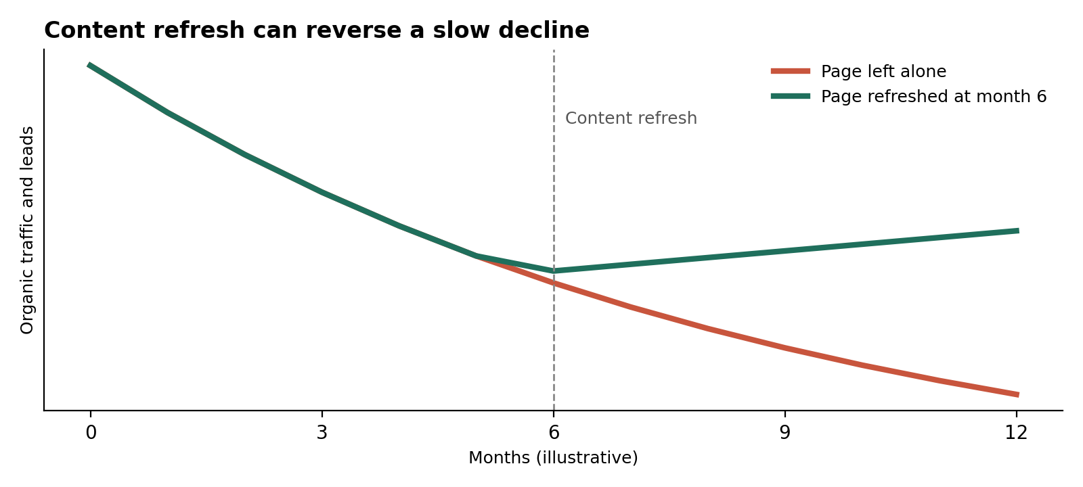
Illustrative example only. Not measured data.
What Is Content Decay?
Content decay is the gradual loss of search traffic, rankings and conversions on a page that once performed well. It rarely happens overnight. A page slips from position three to six, then to ten, and the clicks fall away with it.
The cruel part is that your best pages are the most exposed. They earned their rankings long ago, so they get the least attention. Meanwhile, competitors keep publishing, searchers keep changing their expectations and the page stays frozen in time. The fix is a regular content refresh, and the sooner it starts, the less ground you lose.
Why High-Traffic Pages Lose Rankings
There is usually more than one cause. These are the six we see most often.
1. The information goes out of date
Old statistics, retired tools, outdated prices and last year’s screenshots all signal that a page is no longer the best answer. Visitors notice, and so do search engines.
2. Competitors publish something better
Rival pages get fresher examples, clearer structure and richer answers. Over time they edge past you, one position at a time.
3. Search intent shifts
What people want from a query changes. Results that once favoured long guides may now favour short answers, comparison tables or videos. Features such as featured snippets and AI-generated summaries can also reduce clicks even when your ranking holds.
4. Links and authority fade
Pages that linked to you get deleted or redirected, and fewer new sites link to an ageing article. Your internal links may also have drifted as the site grew.
5. Technical drift creeps in
Slower load times, broken links, bloated plugins and layout changes slowly erode the experience. Each problem is small, but together they weigh on performance.
6. Your own pages compete
As you publish more, newer posts can overlap with older ones and split ranking signals between them. Without a clear owner for each topic, neither page wins.
Why Lost Rankings Also Mean Lost Leads
A traffic drop is only half the story. High-traffic pages often carry your best calls to action, so when rankings slip, enquiries slip faster than visits.
- Top positions earn disproportionate clicks: moving from the first results to the lower half of page one can cut visits sharply.
- Stale offers hurt conversion: old pricing, expired promotions and outdated contact details put people off.
- Weak calls to action: a page written years ago may not match how you sell today.
- Lower trust: visitors judge your business by how current the page feels.
Warning Signs You Need a Content Refresh
Check your reports for these signals before the decline becomes expensive. Each one is a cue for a content refresh.
- Clicks from Google have fallen for three months or more.
- Average position has slipped on queries you once owned.
- Click-through rate is dropping even though impressions are steady.
- Leads from the page have declined while the form or phone number is unchanged.
- The page mentions years, tools or figures that are clearly out of date.
How to Find Decaying Pages
You can find most decaying pages with free tools and an hour of patience.
- Open Google Search Console. Use the Search Console performance report to compare the last three months with the same period a year earlier.
- Sort by lost clicks. The pages with the biggest drops in clicks are your first candidates.
- Add lead data. Compare form fills, calls and revenue from your analytics so you can rank pages by business value, not just traffic.
- Build a shortlist. Aim for ten pages that have both strong history and clear decline.
A 7-Step Content Refresh Process
A proper content refresh is more than changing a date or adding a paragraph. Work through these steps on each priority page.
- Re-check search intent. Search the main query and see what now ranks. Match the format and depth that searchers expect.
- Update facts and examples. Replace old statistics, tools, screenshots and prices with current ones, and cite reliable sources.
- Improve structure. Add clear headings, short answers near the top, a comparison table where useful and an FAQ section.
- Rewrite the title and meta description. Make them more specific and more appealing to improve click-through rate.
- Strengthen internal links. Link to the page from newer, relevant content and link out to your service pages.
- Refresh the call to action. Make sure the offer, form and contact details match how you work today.
- Republish honestly and request indexing. Change the visible date only when the page has genuinely changed. Google’s guidance on people-first content specifically warns against making pages look fresh by altering dates without real updates.
Content Refresh Priority Guide
Use this table to decide what to fix first in your content refresh, and how.
| Signal | Likely cause | Fix | Priority |
| Clicks falling for 3+ months | Outdated information or stronger competitors | Update facts, add depth and examples | High |
| Position slipping on main query | Search intent has shifted | Re-check results and match the format | High |
| Impressions steady, CTR dropping | Weak title or snippet competition | Rewrite title and meta description | Medium |
| Traffic steady, leads dropping | Stale offer or call to action | Refresh the offer, form and contact details | High |
| Two pages ranking for one query | Content cannibalisation | Merge pages and redirect the weaker one | Medium |
Content Refresh Support Across Australian Cities
Local competition makes decay even more costly, because the pages that win local searches change often. We support businesses in every major city.
- Sydney: highly competitive local searches mean pages need frequent updates. See our Sydney
- Melbourne: busy professional and service markets reward fresh, detailed answers. Explore Melbourne.
- Brisbane: growing local businesses need pages that keep up with new competitors. Visit Brisbane.
- Perth: trades, resources and service firms rely on accurate local pages. See Perth.
- Adelaide: local search visibility depends on up-to-date business details and reviews. Check Adelaide.
- Canberra: professional and government-facing services need credible, current content. Read about Canberra.
See all areas on our locations page.
Get Expert Help With Your Content Refresh
A content refresh works best when it connects to a wider plan. Our team can audit your top pages, rank them by lead value and rebuild the ones that matter most.
- SEO services: audits, on-page updates, technical fixes and local SEO to win rankings back.
- PPC and Google Ads: protect lead flow with paid search while organic pages recover.
- Social media marketing: give refreshed content a second wave of attention.
Browse all digital marketing services, learn more about us, read the blog, check the FAQs or request a free marketing review. You can also call 1300 649 299.
Content Refresh: Frequently Asked Questions
What is a content refresh?
A content refresh is the process of updating an existing page with current information, better structure and a stronger call to action so it can recover rankings and leads.
How often should I refresh old content?
Review your top pages every quarter and refresh any that show falling clicks, outdated facts or weaker conversions. Fast-changing topics may need more frequent updates.
Does updating the date improve rankings?
Not by itself. Google advises against changing dates to make a page look fresh when little has changed. Improve the content first, then update the date honestly.
Should I refresh or rewrite a decaying page?
Refresh when the topic and URL still fit the search intent. Rewrite or merge pages when the intent has changed or several posts compete for the same query.
Final Thoughts
Content decay is normal, but ignoring it is a choice. Your best pages earned their rankings once, and a regular content refresh is how you keep them. Check your reports, shortlist your ten most valuable pages and start with one this week. Need a hand? Book a free consultation with our team.